2026.9
Zap AI, previously available in preview, is now rolling out to all eligible customers, with credit-based usage and the option for administrators to purchase additional credits. This release also brings Zap Live refresh improvements with per-query loading and finer refresh controls, streamlined link attribute configuration with token mapping to model parameters, and multi-select slicer enhancements including an "All matching items" option and Shift-click range selection.
Zap AI
Zap AI is rolling out
Zap AI brings AI to Zap Data Hub. In the Zap AI chat panel, you can ask an AI agent questions about your data and about using Data Hub, and have it make changes to your reports.
We're rolling out Zap AI to eligible customers over the coming weeks, and it will be generally available in 2026.10. We'll share full details then, including an explainer of what Zap AI can do for you.
To get started, see Using Zap AI.
Zap AI usage is free during the initial release period.
Data Hub enhancements
Zap Live enhancements
Query refresh improvements
Zap Live now loads queries separately instead of all at once, so results start coming back sooner, and workbooks with many queries no longer run into errors. Queries waiting to be refreshed show a loading indicator in the query dropdown.
You also have more control over what gets refreshed:
- Refresh query - A new button in the task pane toolbar refreshes the selected query.
- Refresh queries… - A new option in the Query menu lets you choose which queries in the workbook to refresh.
- Refresh - The ribbon's Refresh dropdown is now a single button that refreshes the queries used by the selected cells.
The Automatic table switch has moved from the task pane toolbar to the Query menu.
See Refreshing data for more information.
Modeling enhancements
Link attribute improvements
Following user feedback, we have made a range of improvements to link attributes, making them easier to configure and more flexible. In addition to a streamlined interface, link tokens can now be mapped to both attribute columns and model parameters.
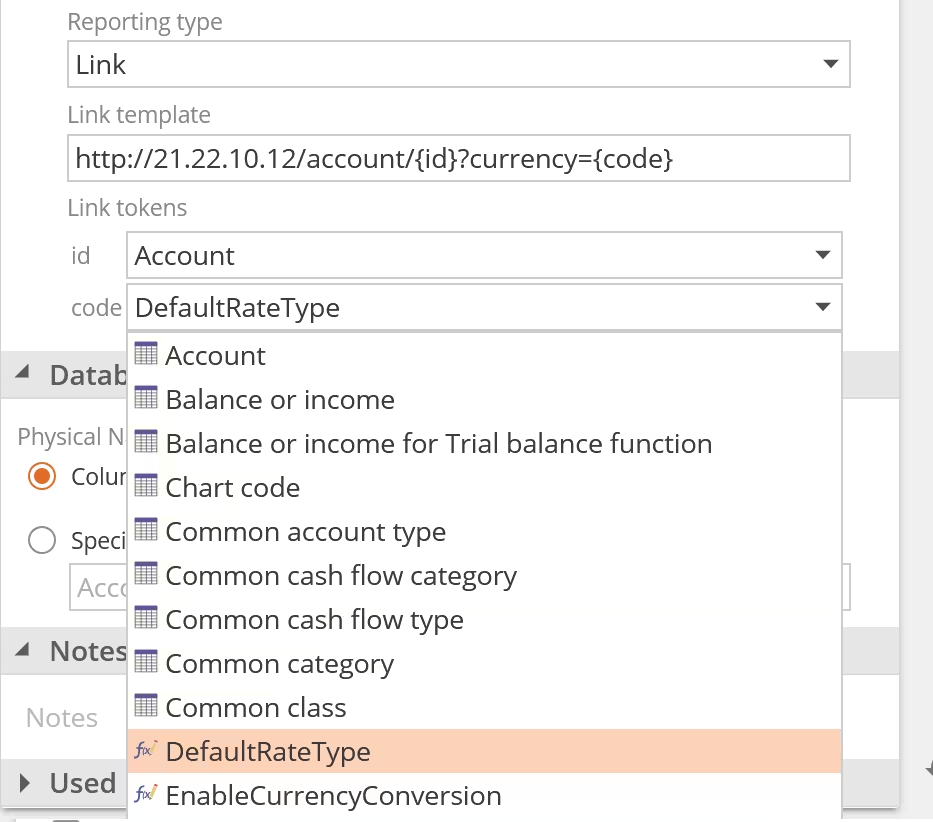
If you want to enrich your reports with convenient links back to your ERP or other external resources, see Display attribute values as links to get started.
Analytics enhancements
Multi-select slicer improvements
When you search in a multi-select slicer, an All matching items option now appears alongside All items. Click All matching items to select or clear just the items that match your search, leaving the rest of your selection unchanged. All items continues to apply to every item in the slicer, whether or not you are searching.
Both options show a partial state when only some of their items are selected, so you can see at a glance what a search has selected before you clear it.
You can also select or deselect a range of items at once. Click an item, then hold Shift and click another item to select or deselect everything between them.

Installing on-premises
To install or update Zap Data Hub on-premises, see the installation instructions. On-premises releases are typically one version behind the latest cloud release.
Performance Enhancements
Every release contains performance enhancements and bug fixes to improve Data Hub.